The back office and client trip app for independent travel advisors.
Run your agency from one advisor portal — clients, bookings, commission, and host-agency reports. Give every client a trip app in your brand. And let AI turn uploaded confirmations into itineraries, so you stop retyping bookings by hand.

The problem
The parts of the job nobody automated.
None of this is hypothetical — it's what actually happens between "trip planned" and "trip taken."
Your host agency covers most bookings. Not all of them. The hotel you booked direct for a better rate still has to make it into your report.
Your CRM is a spreadsheet, a notes app, and a shoebox of confirmation emails. Traveler details live wherever you last typed them.
Clients text you for their itinerary because logging into five different confirmation emails is worse than just asking you.
Commission tracking happens in your head — until tax season, or until your host agency asks for a summary by Friday.

The fix
Two portals. One platform.
Everything above, handled in one place: the portal you run your agency from, and the trip app your clients actually open. Real screens from a demo agency — not mockups.
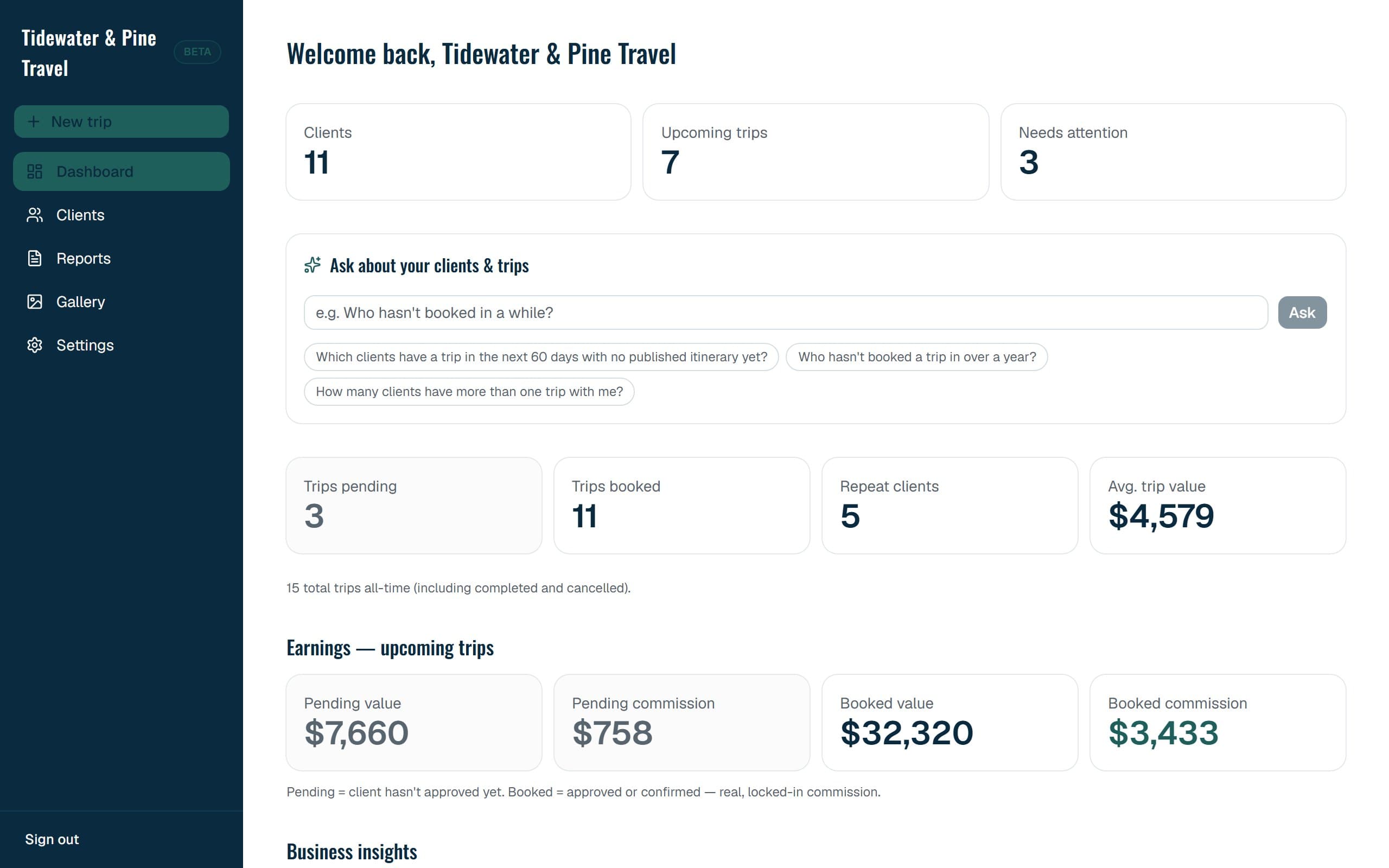
Your whole agency on one screen
- Clients, upcoming trips, and what needs you today
- Booked and pending commission, always current
- An AI assistant that answers questions about your clients
- Business insights and one-click host-agency reports
A trip app your clients actually open — in your brand
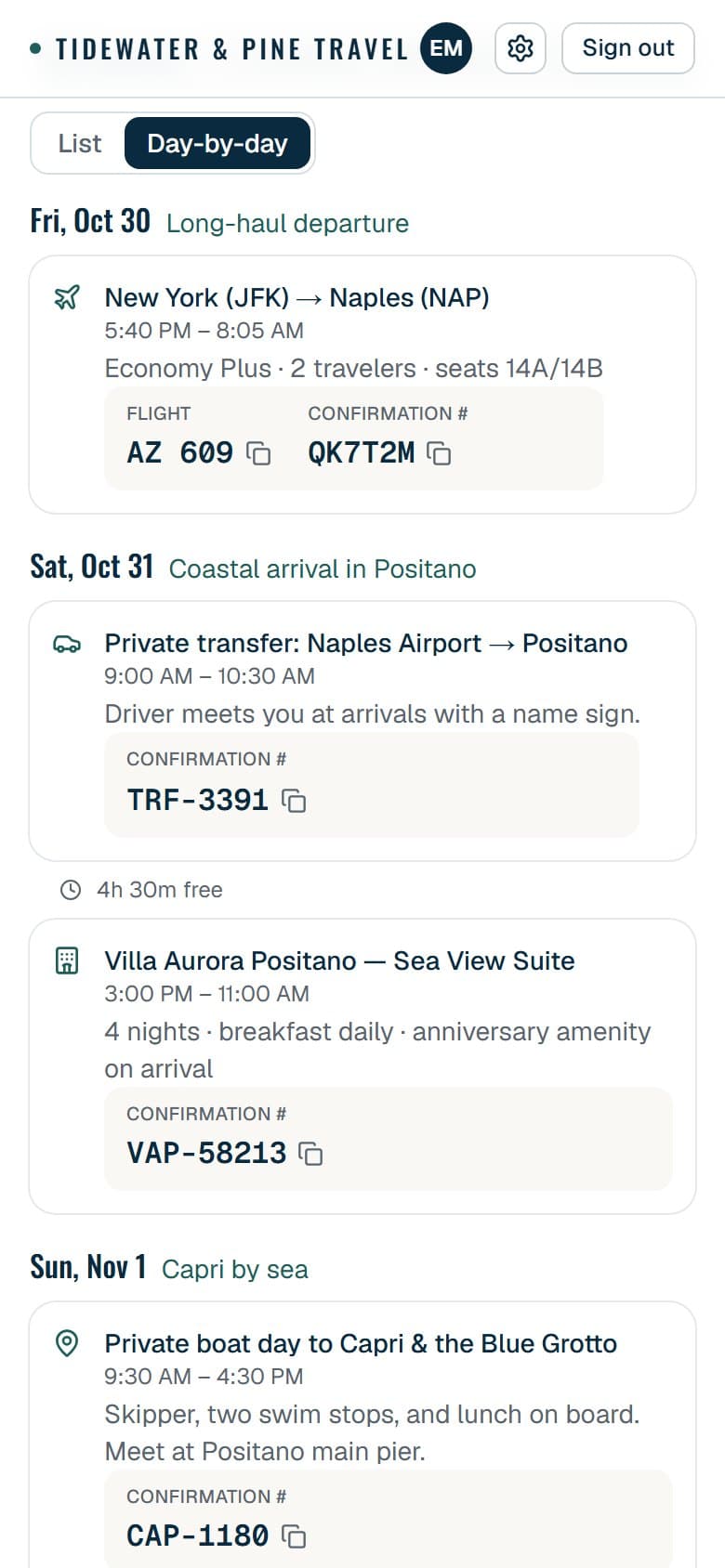
- A day-by-day plan, confirmation codes one tap away
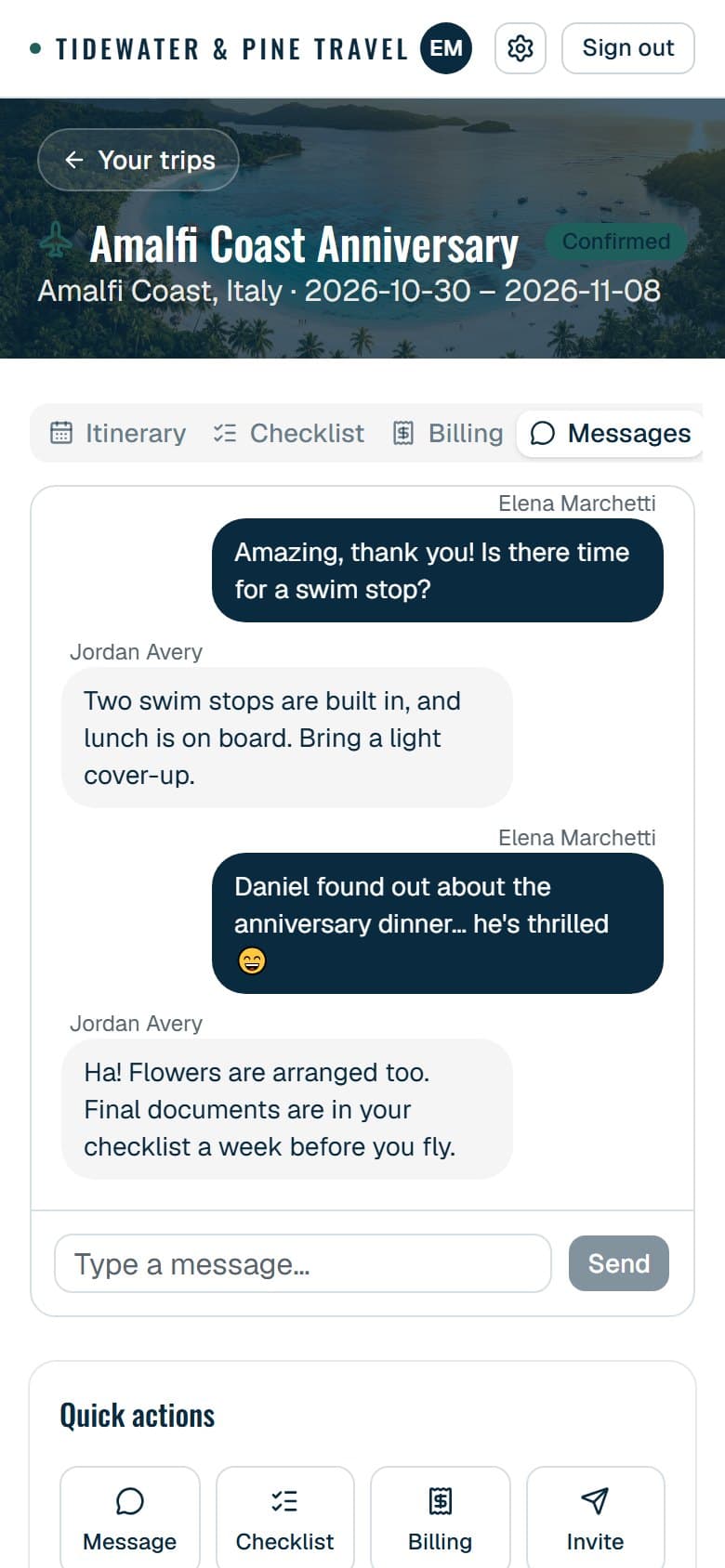
- Live chat with you, right inside their trip
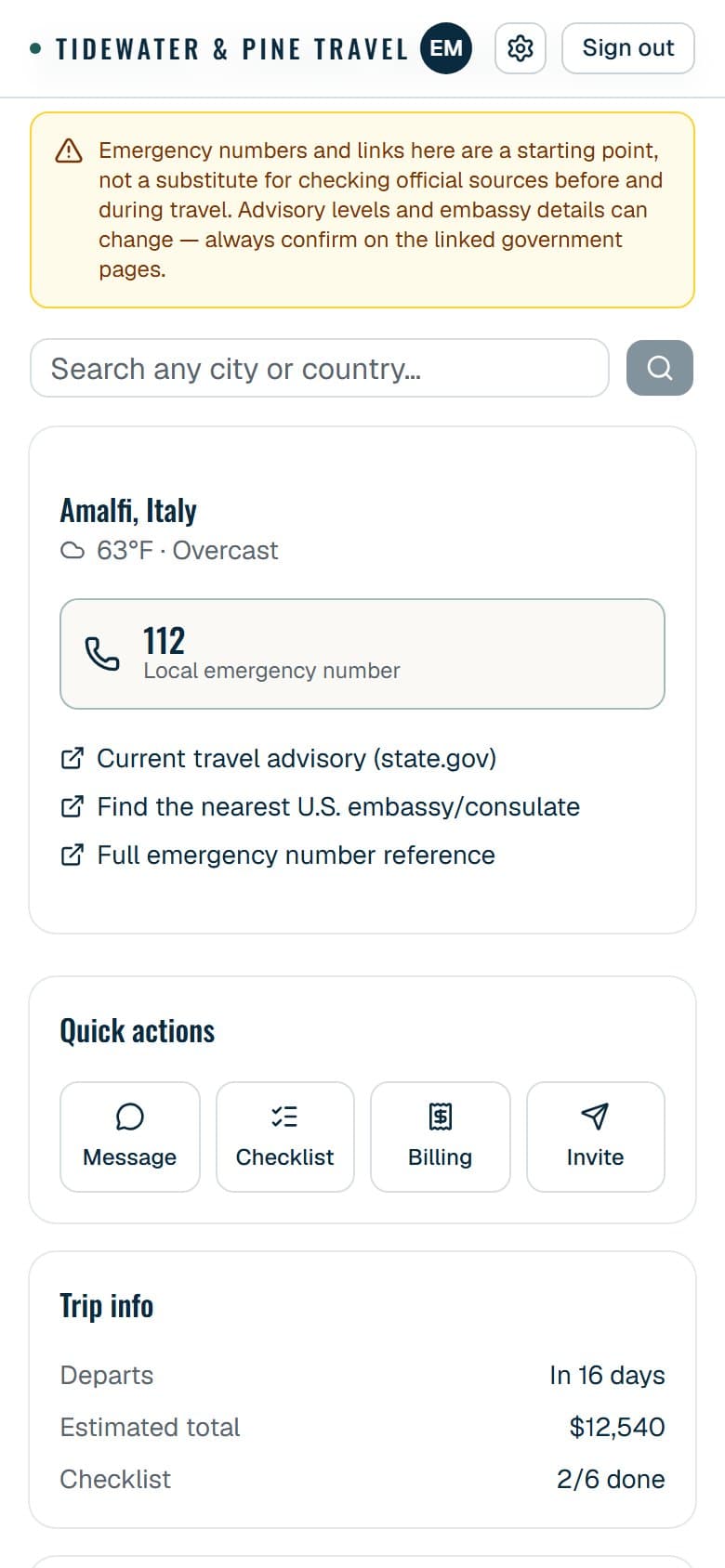
- Local emergency numbers and advisories for where they're headed
- Opens from their home screen and works with no signal
Upload a confirmation. Get an itinerary.
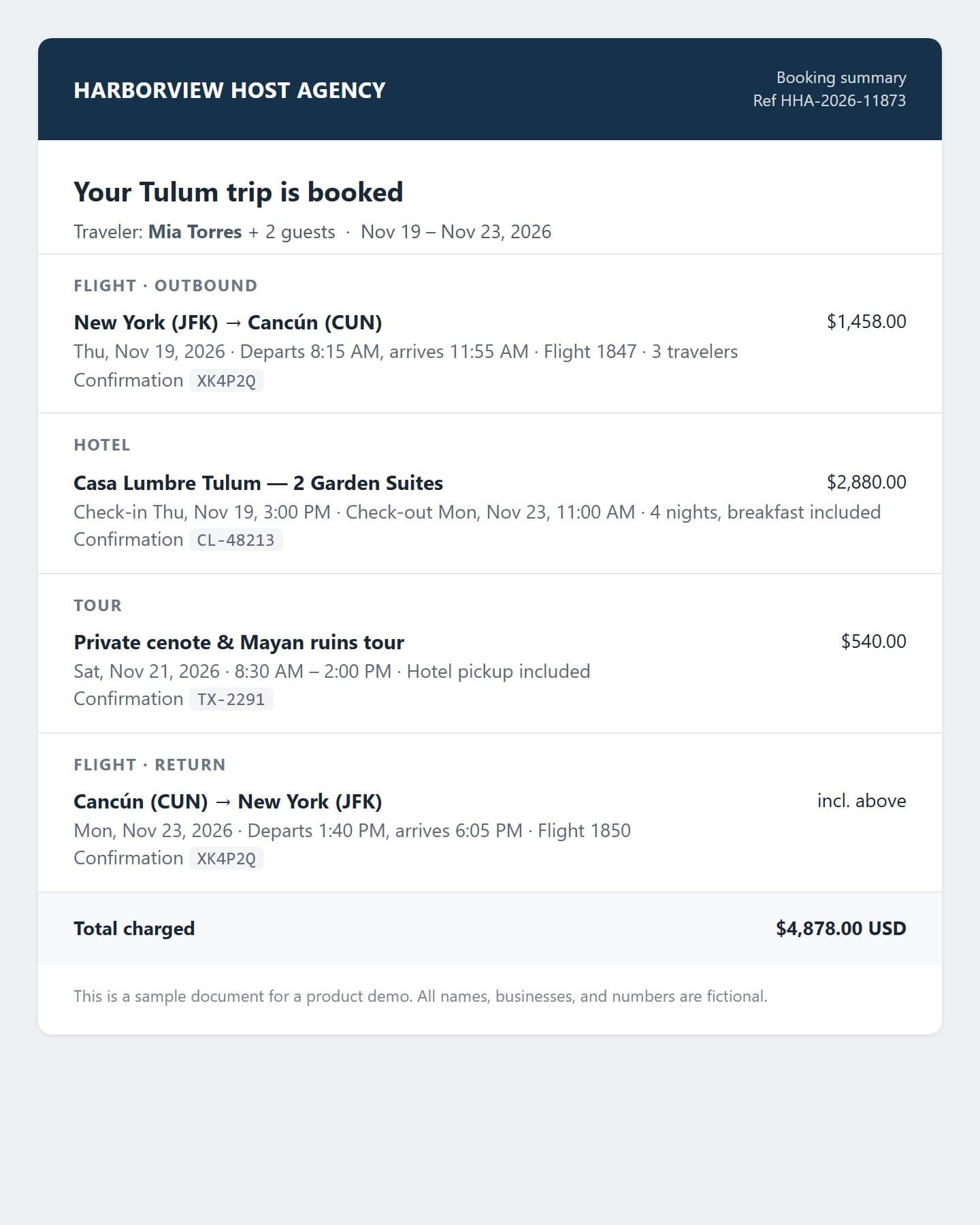
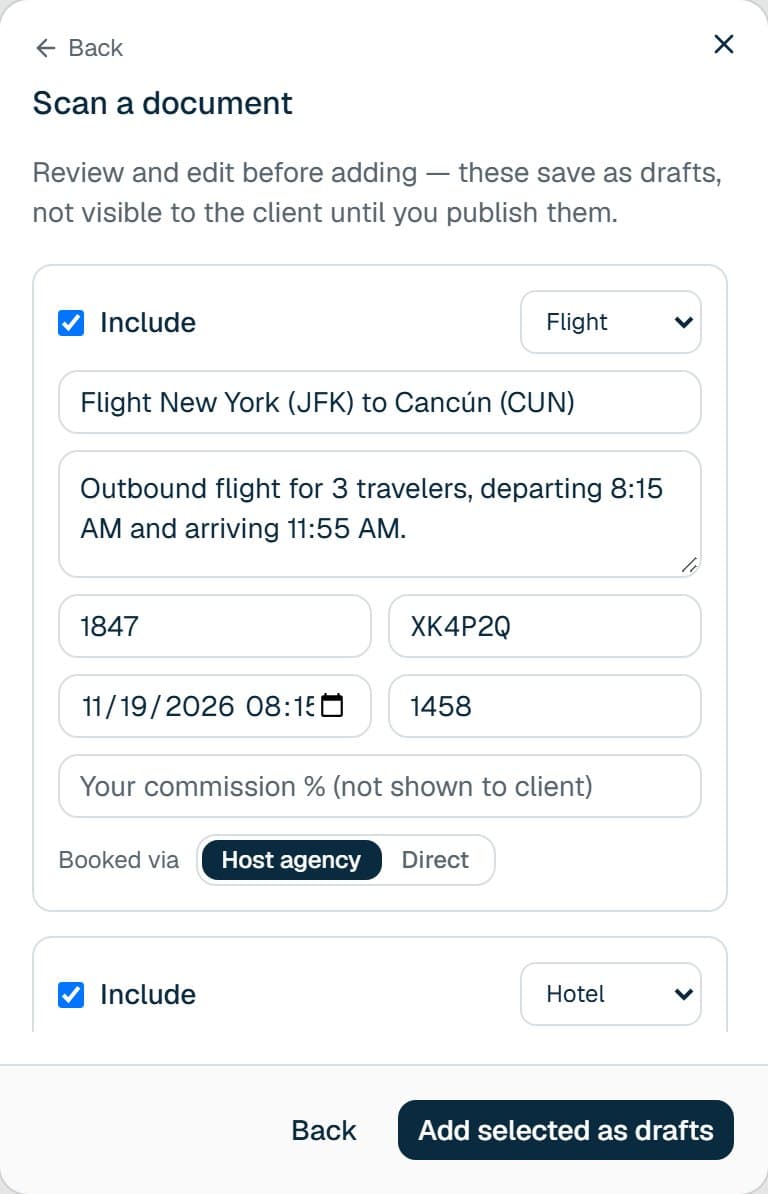
Snap a photo or drop in a PDF. AI pulls out the dates, times, flight numbers, confirmation codes, and prices, and drafts the itinerary — you review it, add your commission, and publish.
What's inside
One system, tailored to your practice.
Every feature below is running today — and nothing looks the same from one advisor's version to the next.
Your brand, not ours
Your logo and your accent color, live across your dashboard, your clients' portal, their account setup page, and anything you share — a custom domain is on the roadmap.
Client portal & live chat
Branded itinerary approval, real-time messaging with your client, a shared trip checklist, and photo sharing they actually open.
Travel safety, built in
Local emergency numbers, embassy locators, and live weather — auto-filled for the trip's destination, or searchable for anywhere else your client is headed.
AI daily schedule
Itinerary items become a real day-by-day plan, with free-time gaps between activities flagged automatically — not just a flat list of bookings.
Travel profile
Travel document details, Known Traveler #, emergency contact, dietary and accessibility needs — on file before you need them.
AI itinerary import
Upload a confirmation PDF or snap a photo of a receipt. AI reads the booking — dates, times, flight numbers, confirmation codes, prices — and drafts the itinerary for you to approve.
Ask your business anything
Type a question in plain English — who hasn't booked in over a year, which trips still need an itinerary — and get an answer from your own client and trip data.
Upload, submit, and email your host agency
Flag what you booked direct versus through your host agency, and send the report in one click — your IATA/ARC included.
Commission, tracked automatically
Every booking splits into pending (quoted, not yet approved) and booked (confirmed, real commission) — bookings and commission by month, trip status, your top destinations.
Group invites
Set a slot count when you plan a group trip. Invite links stop working the moment it's full.
Onboarding, your way
Add a client by hand, send a link they fill in themselves, or drop in a CSV for a whole list at once.
Share without signup
A read-only link (or QR code) for family who want the itinerary and nothing else — no account required.
What your clients get
The part they actually see.
You're not the only one evaluating this — your clients experience it too, and it's the reason they'll remember working with you.
A real day-by-day plan, not a list of bookings
AI turns their itinerary into an actual daily schedule, flagging free time between activities automatically.
Confirmation codes, one tap to copy
Big, legible, tap-to-copy — pull it up at a check-in counter or hotel desk, no digging through old emails.
Still there with no signal
Once they've opened their trip once, the itinerary, confirmation codes, and safety info stay viewable completely offline.
Real-time chat, not an email chain
A live thread with you, right in their portal — no more "did you get my last message?"
Reminders that actually help
A nudge the day before departure, a check-in a week out if their checklist still has open items — not a screen they have to remember to check.
Emergency info for wherever they are
Local emergency numbers, embassy locators, and live weather — filled in for their trip automatically, or searchable for anywhere else they're headed.
Photo sharing that doubles as your marketing
They share trip photos in the moment; with their OK, you can feature the best ones — real content from a real client, not stock photography.
Opens like a real app, no app store
They add it to their home screen straight from the browser — an icon that opens instantly, nothing to download or update.
How it works
From receipt to client portal, in five steps.
This is the actual workflow — not a simplified pitch version of it.
- 01
Create your agency
Your branding, IATA/ARC and tax details, and host agency. Everything downstream is scoped to your business.
- 02
Add your clients
By hand, with a link they fill in themselves, or a whole list from a CSV — travel documents and emergency contacts included.
- 03AI-assisted
Upload a confirmation, get an itinerary
Drop in a PDF or snap a photo of a receipt. AI reads the booking and drafts the itinerary, instead of you retyping it.
- 04
Review, then publish
Add pricing and your commission, mark host agency or direct, and publish to your client in one click.
- 05
Your client sees it live
Their trip app updates the moment you publish — day-by-day plan, checklist, chat, safety info, and photos.
Built to give you back the hours you lose to admin. The receipt-to-itinerary step used to mean copy-pasting confirmation numbers into a document by hand. Now it's the time it takes to take a photo — you review and approve, the system does the retyping.
Two ways to work together
Built for you, or run for you.
The same system either way. The real difference is who updates it going forward — plus branding, domain, and who's holding the keys.

Option 01
Hosted & managed by us
Your logo and accent color, live everywhere your clients see it — live fast, with a small setup charge and a low monthly fee.
- Your logo and accent color, set once in Settings — no design work, no waiting on us
- Small one-time setup fee, then a flat monthly fee
- We host, back up, and support it — nothing for you to maintain
- New features roll out to your account automatically as we ship them — no separate upgrade, no extra charge
- Live in days, lowest cost to start

Option 02
Custom-built, fully yours
We build the entire system — app, client portal, and the database behind it — then deploy it to hosting you choose and control.
- Fully custom branding, theme, and layout, built around your specific workflow
- Deployed to your own domain, on hosting and accounts you own — not ours
- One-time build fee, handed off complete with documentation
- From there, you (or your IT team) own updates, hosting, and support — it's a standalone copy as of the day it's delivered, not connected to our future updates
- Fully yours — no recurring fee to us, ever
Who it's for
Built from the actual, unglamorous workflow of running a travel-advisory practice — the bookings your host agency covers and the ones you make direct, both needing to end up in the same report; the client who wants their itinerary without five confirmation emails; the commission math you shouldn't have to keep in your head.
Every feature on this page is running today, not a mockup or a pitch-deck slide.
FAQ
Questions travel advisors ask us.
What is Ithaca?
Ithaca is a back office and client trip app for independent travel advisors. You run your agency from the advisor portal — clients, bookings, commission, and host-agency reports — and every client gets a trip app in your brand with their day-by-day itinerary, chat with you, and safety info.
Does it work with my host agency?
Yes. Ithaca works alongside any host agency with no migration. You mark each booking as booked through your host agency or direct, and email your host agency a booking report in one click.
How does the AI itinerary import work?
Upload a confirmation PDF or a photo of a receipt. AI reads the dates, times, flight numbers, confirmation codes, and prices and drafts the itinerary items. Nothing reaches your client until you review and publish.
Do my clients need to download an app?
No. Their trip opens in the browser and can be added to their home screen like an app. Once they've opened a trip, the itinerary, confirmation codes, and safety info stay viewable offline.
How much does it cost?
Ithaca is in an invite-only beta. Founding advisors get the one-time setup fee waived and their first month free, then a flat monthly membership that includes a monthly AI allowance. You'll see full pricing after entering your access code.
How do I get an access code?
Codes are given out personally during the closed beta, one per advisor. If someone shared a code with you, apply with it; if not, reach out and tell us about your practice.
Is my clients' data private?
Your data stays yours. Every advisor's data is isolated at the database level, and client portals only ever show a client their own trips. See our Privacy Policy and Data Processing Addendum for the details.
Can I use my own branding?
Yes. Your logo and accent color appear across your dashboard, your clients' trip app, their account setup page, and anything you share. Custom domains are on the roadmap.

See it running on real clients.
No slideshow — the actual tool, on real trips. Ithaca is in closed beta with a limited number of seats, so you'll need an access code to join — tell us a bit about your business to get started.